
小记录
最近看完了head first python,虽然跟着教程,在书中指定的网站做了一个线上可访问的链接。但是还是像自己学会在任何liunx环境下部署python项目。
一开始看了用宝塔,但是中途操作有误,而且类似的教程很少,想想还是从最底层的linux环境下学会配置吧。
于是在阿里云服务器上面配置起来了,但是外网还是没法直接访问,应该是服务器没有备案的原因。于是乎,用一台以前买的绿云服务器来操作。于是重装了系统。
做程序员就是有很多乌七八糟的破事吧,因为绿云服务器商家只提供centos8,但是centos8在2021年就停止了服务,在操作过程中有一些问题,只能求助于他们家的客服,好在三哥回复及时,处理高效。看来绿云还是可以续费的。
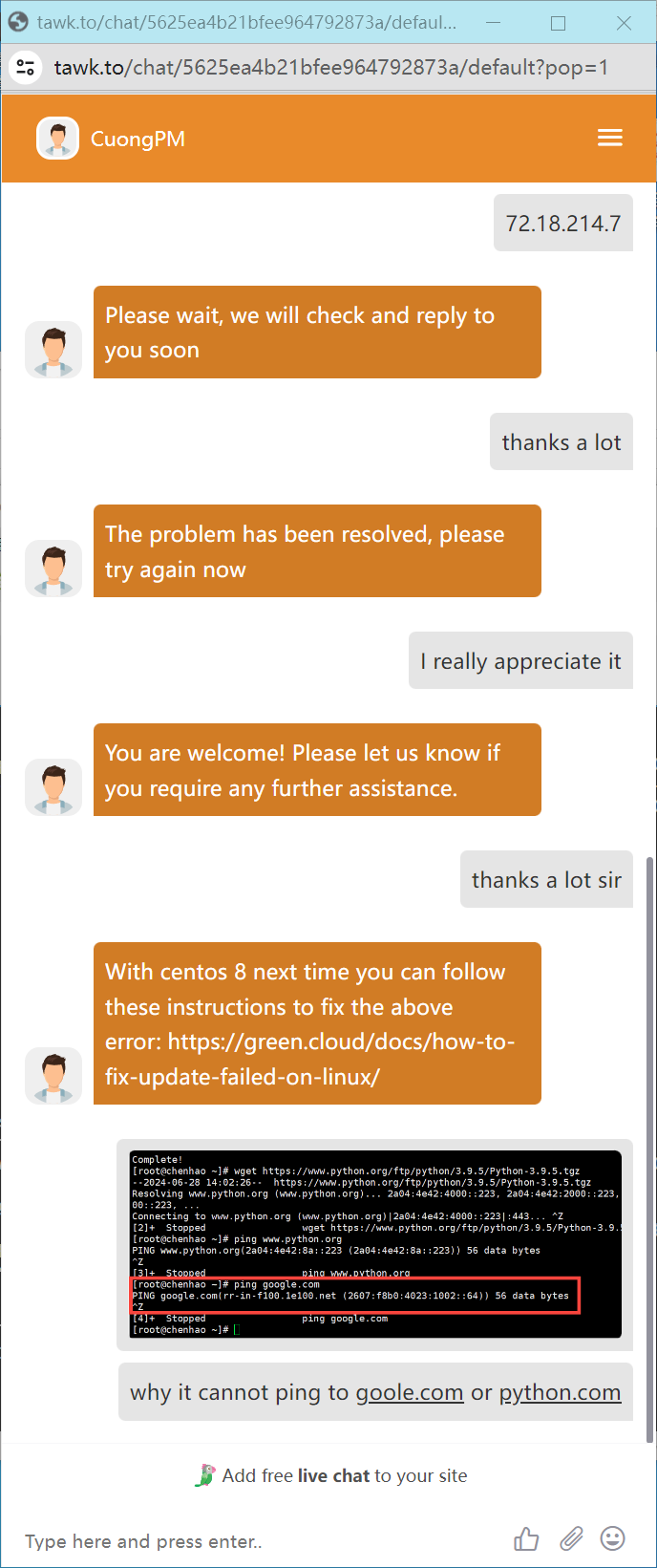
就是可笑我的英语水平跟现在的编程水平一样蹩脚哈哈哈。
这是客服给出的解决方案:https://green.cloud/docs/how-to-fix-update-failed-on-linux/
How to fix update failed on Linux
Estimated reading: 3 minutes 148 views
In this article, you will learn how to fix some common update errors that occur frequently when you try to update on the Linux operating system. Below are 3 error cases encountered when we run updates on our Almalinux, Centos, and Debian 12 versions.
1. “Error: Failed to download metadata for repo ‘appstream’: Cannot prepare internal mirrorlist: No URLs in mirrorlist”
If you, for one reason or the other, are still actively using CentOS 8, you might probably have encountered the following error when trying to update your system or simply install a package.
For example, in the screenshot that follows, I was trying run update and ran into it.

What is the Cause of This Error?
You may well be aware that CentOS Linux 8 died a premature death, it reached the End Of Life (EOL) on December 31st, 2021, thus it no longer receives development resources from the official CentOS project.
This means that after Dec 31st, 2021, to update your CentOS installation, you are required to change the mirrors to CentOS Vault Mirror, where they will be archived permanently.
Solution
To fix the above error, open your terminal or login via SSH, and run the following commands to change the repo URL to point to vault.centos.org, from the official CentOS repos.
Here we use the sed command to edit the required directives or parameters in the repo configuration files:
# sed -i 's/mirrorlist/#mirrorlist/g' /etc/yum.repos.d/CentOS-*
# sed -i 's|#baseurl=http://mirror.centos.org|baseurl=http://vault.centos.org|g' /etc/yum.repos.d/CentOS-*
Alternatively, you can also point to the Cloudflare-based vault repository, by running the following commands:
# sed -i 's/mirrorlist/#mirrorlist/g' /etc/yum.repos.d/CentOS-Linux-*
# sed -i 's|#baseurl=http://mirror.centos.org|baseurl=http://vault.epel.cloud|g' /etc/yum.repos.d/CentOS-Linux-*
Now you should be able to update CentOS or install packages without any error

2. Error: GPG check FAILED
When installing packages on AlmaLinux, if you run into a “GPG check failed” problem, it means that the available GPG keys were unable to verify the signature of the package. A corrupt repository, an out-of-date or missing GPG key, or network problems could all be the cause of this.

Cause
The GPG key for the xfsdump package was not installed, resulting in a GPG check failure during the package installation, which was resolved by importing the necessary key from the AlmaLinux repository.
cloudlinux-release-8.9-2.el8 package contains an updated AlmaLinux key, but won’t help with current systems
Solution
Update the GPG keys that we use to verify packages. Importing the most recent GPG keys from the repository will enable us to perform this. So, we can run the following command:
# rpm --import https://repo.almalinux.org/almalinux/RPM-GPG-KEY-AlmaLinux
Now you should be able to update Almalinux or install packages without any error:
3. Error: sub-process – apt-listchanges
I keep on getting this error when I try to install or upgrade on Debian 12 and almost everything.

Solution
You can fix the error by running the following command
# mv /etc/apt/apt.conf.d/20listchanges /etc/apt/apt.conf.d/20listchanges.bak4. Error: The repository cdrom does not have a release file”
You can see detailed error correction here: How to fix “the repository cdrom does not have a release file” error on Debian 12
Conclusion
And there you have it! A comprehensive guide to fixing the update errors in Linux versions. Trust me, I’ve faced this error more times than I can count and these steps have helped me every single time.
Good Luck!
